Built for baseball & softball

Capture every pitch. Every swing.

Record pitches and swings, find the action, and keep every clip organized by player. Add hands-free Auto Capture and AI coaching with Pro, or create recruiting highlights with Recruit Pro.

COMING SOON  ·  Exclusively for iPhone
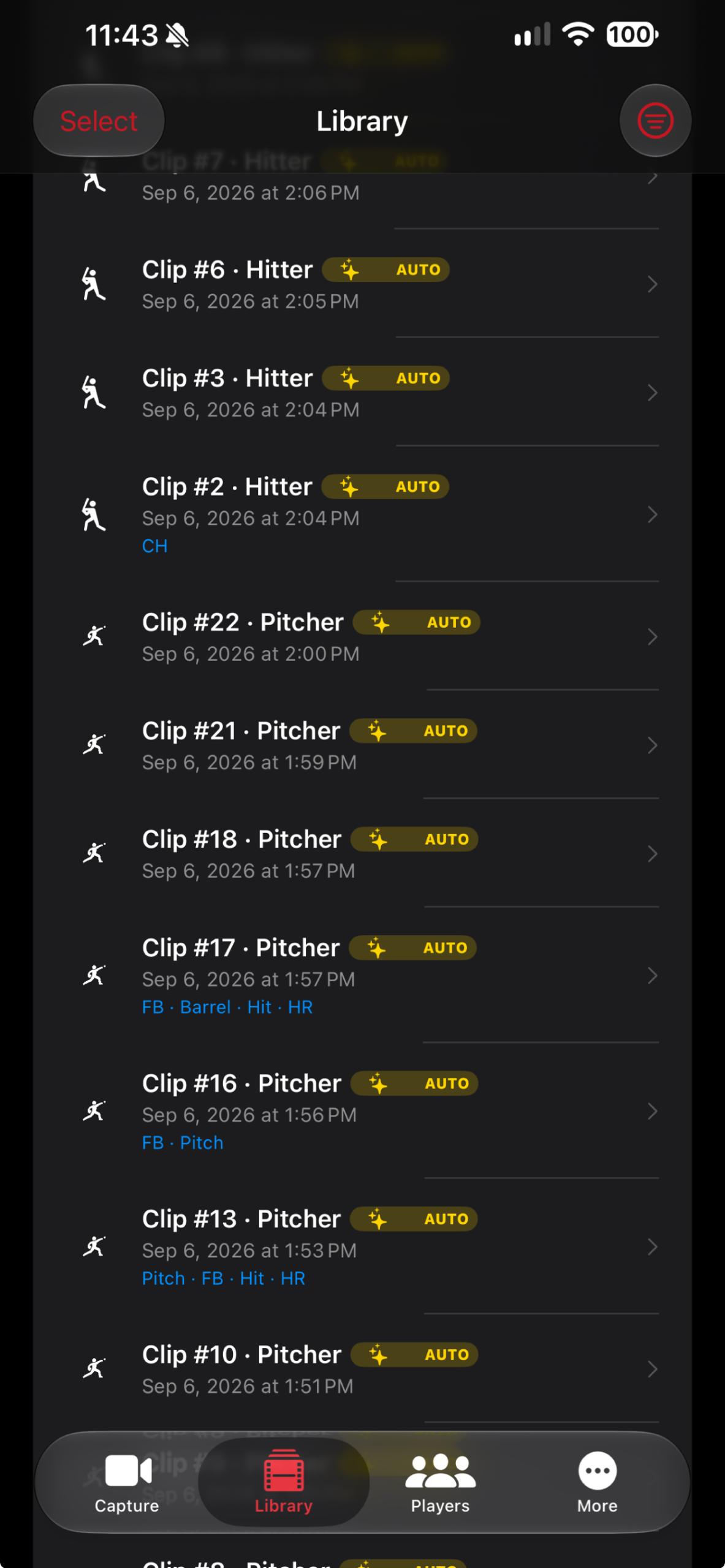
GameClip AI clip library
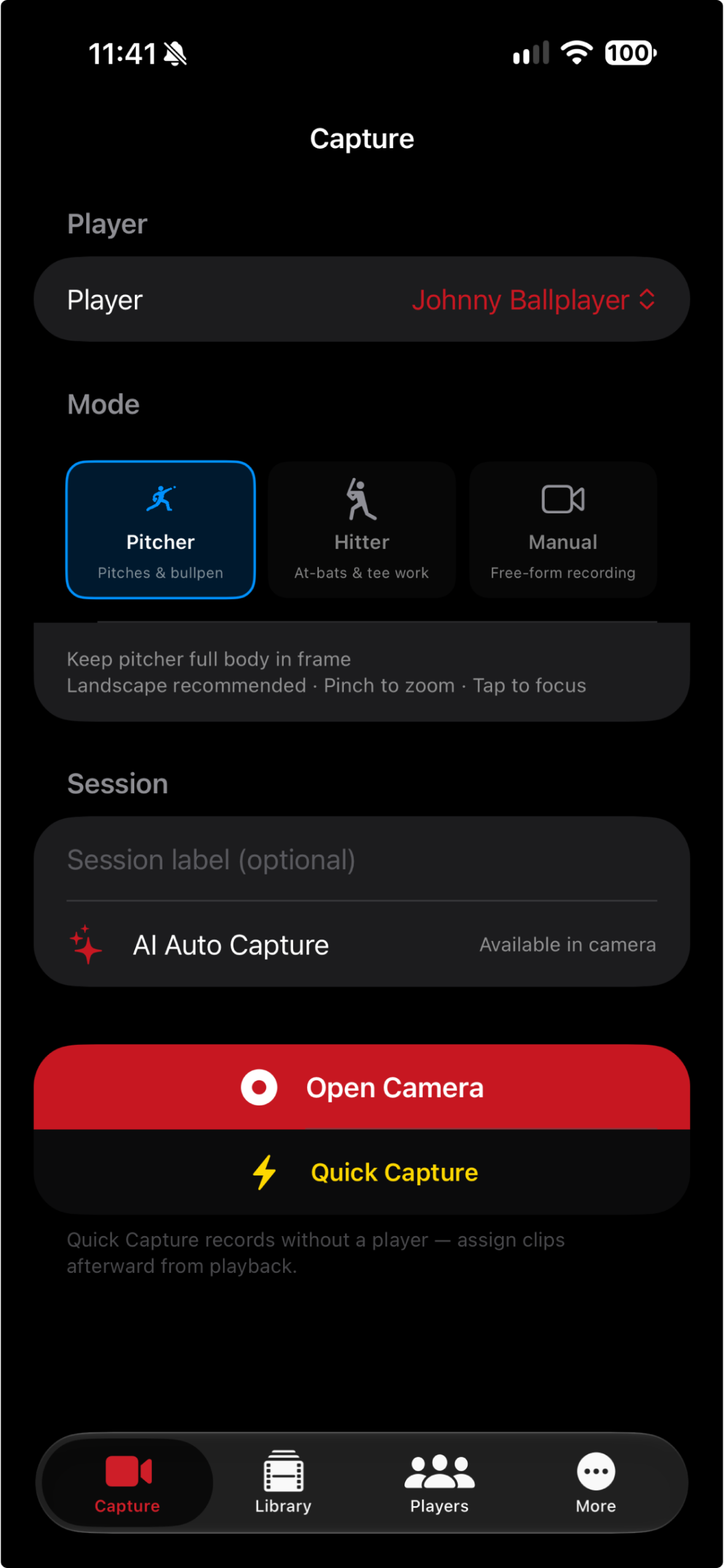
GameClip AI player and capture-mode setup
Find the play. Keep the highlight. On-device Find Pitch / Find Swing and one-tap trimming are included in Free.
Choose your player Pitcher, Hitter, or Manual
Find the action Find and trim on your iPhone
Coach with Pro Auto Capture and AI feedback
Build your reel Best Recruit Reel · Recruit Pro
Simple at the field

From first pitch to ready-to-share.

Start with a player and a camera angle. Record a clip, find the pitch or swing, and share the moments worth keeping.

STEP 01

Choose your player

Sign in, add a player, and choose Pitcher, Hitter, or Manual. Free and Pro include up to 3 players; Recruit Pro is unlimited.

STEP 02

Frame and record

In Pitcher mode, choose Behind the Plate or Open Side. Record manually or use Pro Auto Capture to start when the player sets and save after the action.

STEP 03

Find, review, and share

Use Find Pitch / Find Swing, trim to the play, and add tags. Pro adds AI coaching, recruiting summaries, social captions, and comparison exports.
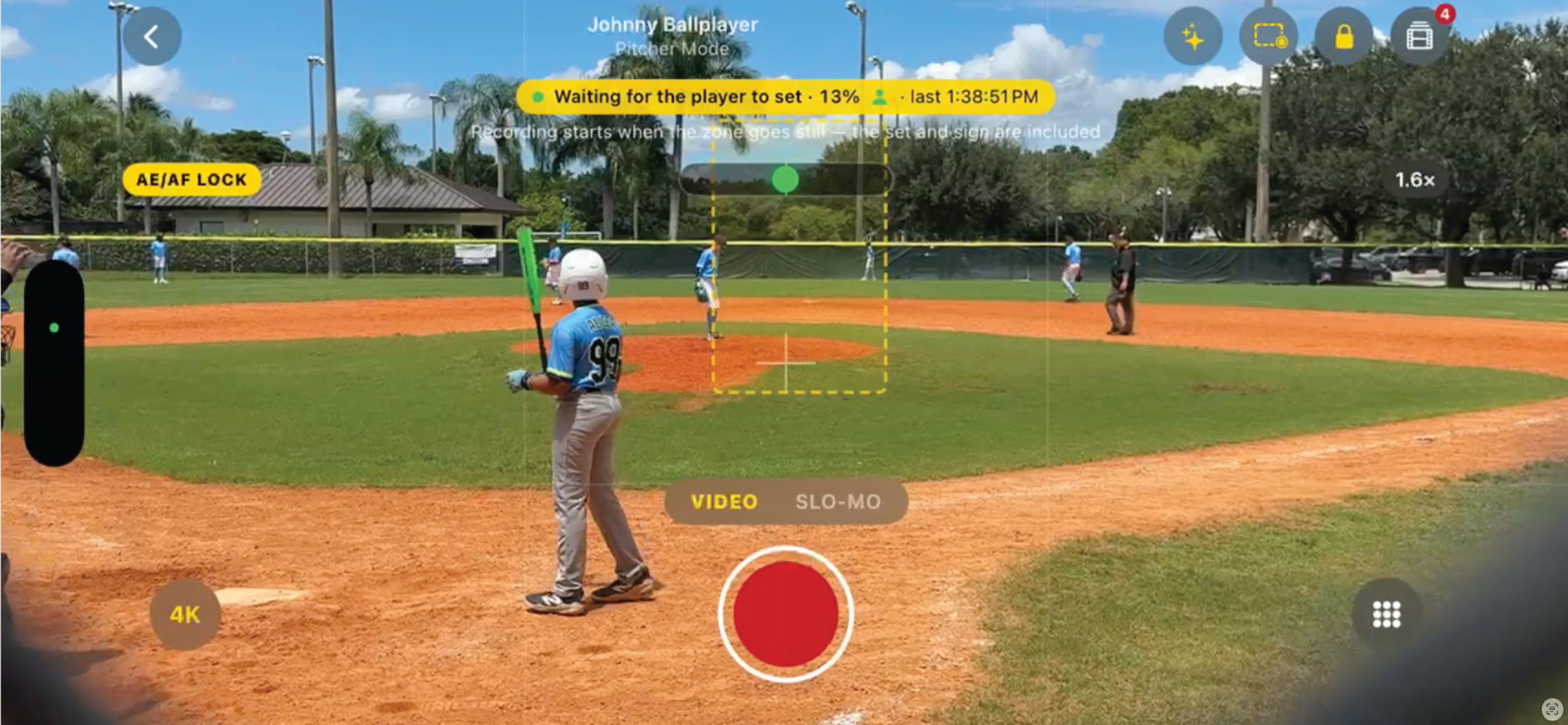
GameClip AI recording a baseball game in Pitcher Mode with on-screen framing and video controls
Real game example See the field. Capture the moment.

Keep the athlete fully in frame. Use focus, zoom, and video-quality controls while filming. For hands-free Auto Capture, draw a detection zone around the player’s setup position.

View the How to Guide

Purpose-built workflow

A baseball & softball camera that knows what comes next.

Free recording and on-device editing, Pro coaching and sharing tools, and Recruit Pro highlights—all in one player-focused app.

Pro + Recruit Pro

Hands-free Auto Capture

Draw a zone around the player. Recording starts when they set; qualifying pitches and swings save as separate clips after the action settles.

Free on-device tools

Find the pitch or swing

Find Pitch / Find Swing locates the action on your iPhone. Jump to it or trim in one tap, with Revert to Original available.

Free player libraries

Keep every clip organized

Browse by player, use tags and session labels, and filter by mode. Free and Pro include 3 players; Recruit Pro includes unlimited players.

Pro + Recruit Pro

AI coaching feedback

Get a Key Strength, Primary Focus Area, Drill Recommendation, and Next Session Goal. Feedback stays with the clip; online analysis has a daily limit.

Pro + Recruit Pro

Compare and share progress

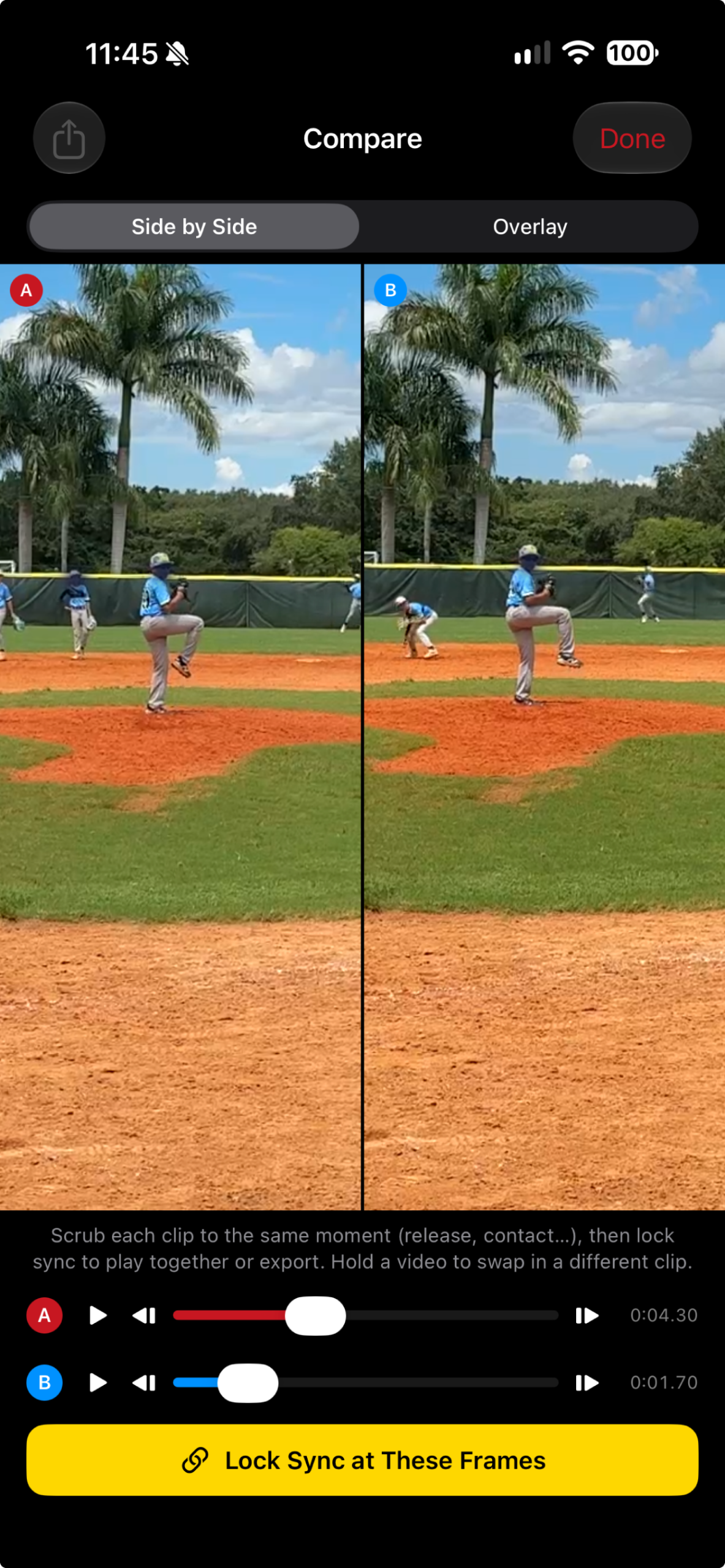
Align two clips, lock sync, and review side by side or as a ghost overlay. Export a silent comparison video while keeping both originals.

Recruit Pro

Build a Best Recruit Reel

Rank a player’s top tagged clips and compile detected pitches or swings into a reel. Add entered baseball metrics and export videos with player-name and stat overlays.

GameClip AI player selection and capture setup
GameClip AI clips organized by player
More than a camera roll

Keep every athlete and every clip organized.

Give each athlete a video history you can browse and share. Keep filming for existing players even if you reach your plan’s player limit.

  • Free and Pro: up to 3 players. Recruit Pro: unlimited players.
  • Search a player’s library by session or tag, and move clips between players.
  • Use PITCH / SWING badges to identify action-trimmed clips; REVIEW flags clips that need a closer look.
  • Optional private iCloud backup and recovery are included with paid plans. Local deletion leaves backed-up iCloud copies intact.
Inside the app

From capture to coaching and sharing.

Navigate with Capture, Library, Players, and More. Find plans, Pro tools, the in-app guide, and Settings under More.
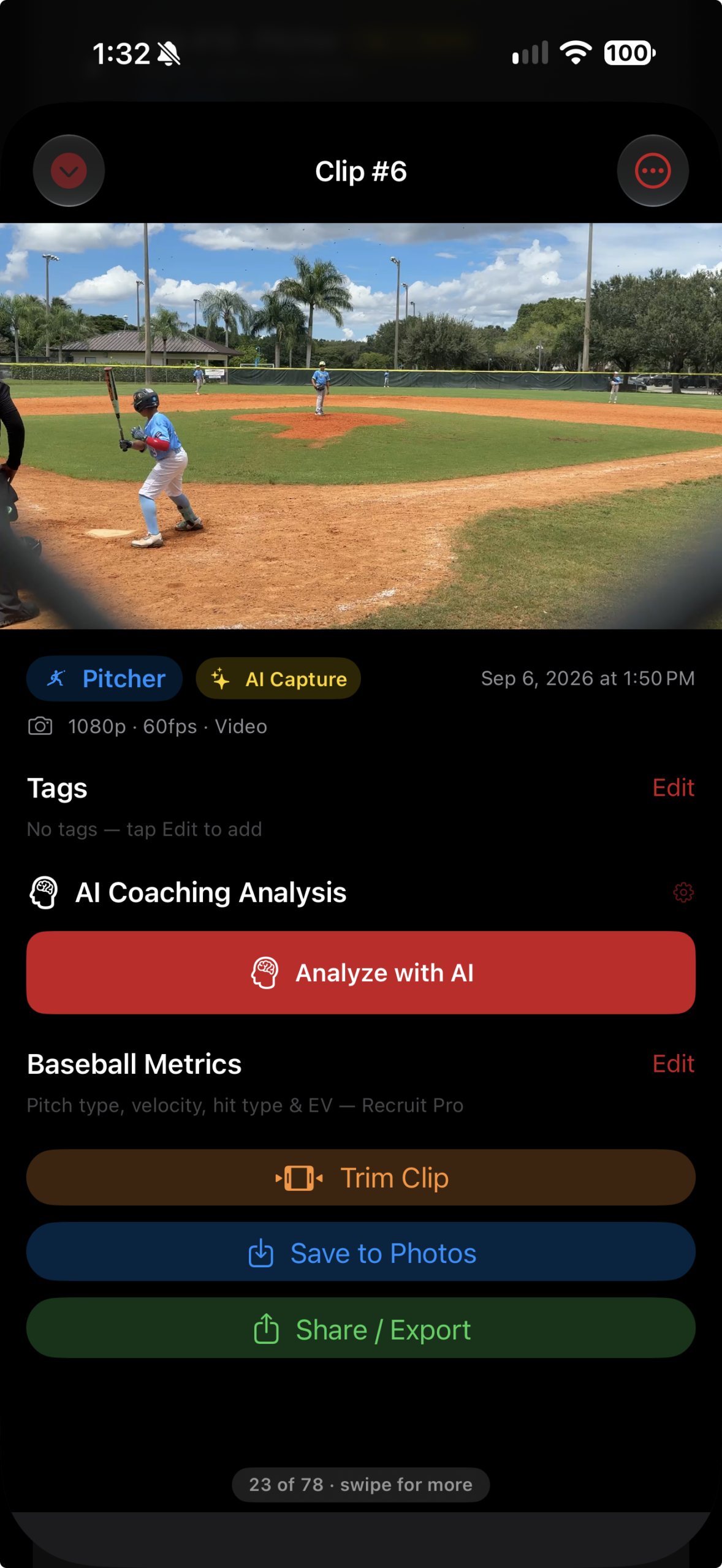
AI coaching · Pro + Recruit Pro

Turn a clip into a coaching conversation.

Open a clip and tap Analyze with AI for focused pitching or hitting feedback. Save the result with the clip and use it to support your next coaching conversation.

  • Key Strength and Primary Focus Area
  • Drill Recommendation and Next Session Goal
  • Saved analysis included with supported shares

AI coaching requires internet access and sends selected still frames and relevant context for analysis. Find Pitch / Find Swing runs on your iPhone and is included in Free.

GameClip AI clip detail showing saved AI coaching analysis
One app, multiple roles

Made for everyone who helps a player get better.

P

Parents

Record manually or let Pro Auto Capture help film each play. Keep the moments that matter organized by athlete.

A

Players

Review mechanics, find and trim pitches or swings, and build a tagged library of your development.

C

Coaches

Compare clips, review saved AI feedback, and share observations with athletes. Recruit Pro supports unlimited player profiles.

R

Recruiting

Share player summaries with Pro. Add metrics overlays and build a Best Recruit Reel with Recruit Pro.

Simple plans. Clear choices.

Start free. Upgrade when you need more game.

Coming soon for iPhone. Capture and organize for free, unlock hands-free recording and AI coaching with Pro, or build recruiting highlights with Recruit Pro.

Free

$0
Capture, organize, and share. Up to 3 players.
  • Manual recording & Bluetooth remote control
  • Player libraries & highlight tags
  • Camera-angle & framing guidance
  • On-device Find Pitch / Find Swing
  • One-tap action trimming & Revert to Original
  • Save to Photos & standard sharing
Coming Soon

Recruit Pro

$99.99 / year
Everything in Pro, with unlimited players.
  • All GameClip AI Pro features
  • Unlimited player profiles
  • Enter pitch velocity, spin & hitting metrics
  • Player name & metrics overlays on exports
  • Best Recruit Reel from top tagged plays
  • Reel clips cut to detected pitches & swings
Coming Soon

Planned launch prices are shown in U.S. dollars and may change before release. Current local pricing and subscription terms will appear in the app. AI coaching requires an internet connection and is subject to daily limits. iCloud backup is optional and uses your available iCloud storage. Reel clips without detected action are kept whole for review.

Frequently asked

Good questions. Clear answers.

GameClip AI is coming soon for iPhone. An Android version is not currently announced.

Record manually, use a Bluetooth camera remote, organize up to 3 players, tag clips, find pitches or swings on your iPhone, trim and revert, save to Photos, and share videos. A free account is required.

Free and Pro include up to 3 player profiles. Recruit Pro includes unlimited players. Reaching the limit only blocks adding new players; your existing players and clips stay accessible.

Pro adds AI Auto Capture, online AI coaching, optional private iCloud backup and recovery, synced comparison and video export, recruiting summaries, and social captions. Recruit Pro includes all of these tools too.

Everything in Pro, plus unlimited players, entered baseball metrics, metrics overlays, and Best Recruit Reel. The reel ranks tagged clips and cuts to detected action; clips without detected action remain whole for review.

No. Recruit Pro lets you enter pitch velocity, spin rate, or exit velocity and use those saved values in supported exports. It does not replace a radar gun.

Clips are stored on your device. Find Pitch / Find Swing runs locally. Online AI coaching sends selected still frames and context; optional paid iCloud backup copies clips to your private Apple account.

Shared team libraries, coach accounts, and a Team plan are not included in this release. Coaches can organize players in their own library and share clips using the iPhone share sheet.

At launch, purchase or restore a plan in More → View Plans. Apple handles billing and subscription management; feature access is tied to your signed-in GameClip account. Current local prices and terms appear in the app.

Follow the How to Guide or contact us. In the app, More → Settings → Support → Contact Support includes your app version and device details.

AI feedback supports a coaching conversation. Review the footage and recommendations with a qualified coach and use their judgment to guide development.

Questions or early access

Ready to capture the game smarter?

Have a question about recording, coaching tools, or recruiting highlights? Contact us or join the launch list for iPhone release updates.

Contact Us / Join the Launch List